 Fantasia
Help center / Audio
Voice Clone
Clone a voice from a 10 to 30 second recording for 4 credits, or describe a voice and pick from three made for you for 2 credits.

- Clone
- 4 credits, 10 to 30 seconds of speech
- Describe
- 2 credits for three voices
- Keep
- Up to 10 voices
When to use it
- You want your own voice, or a new designed one, saved for your characters.
Clone your voice
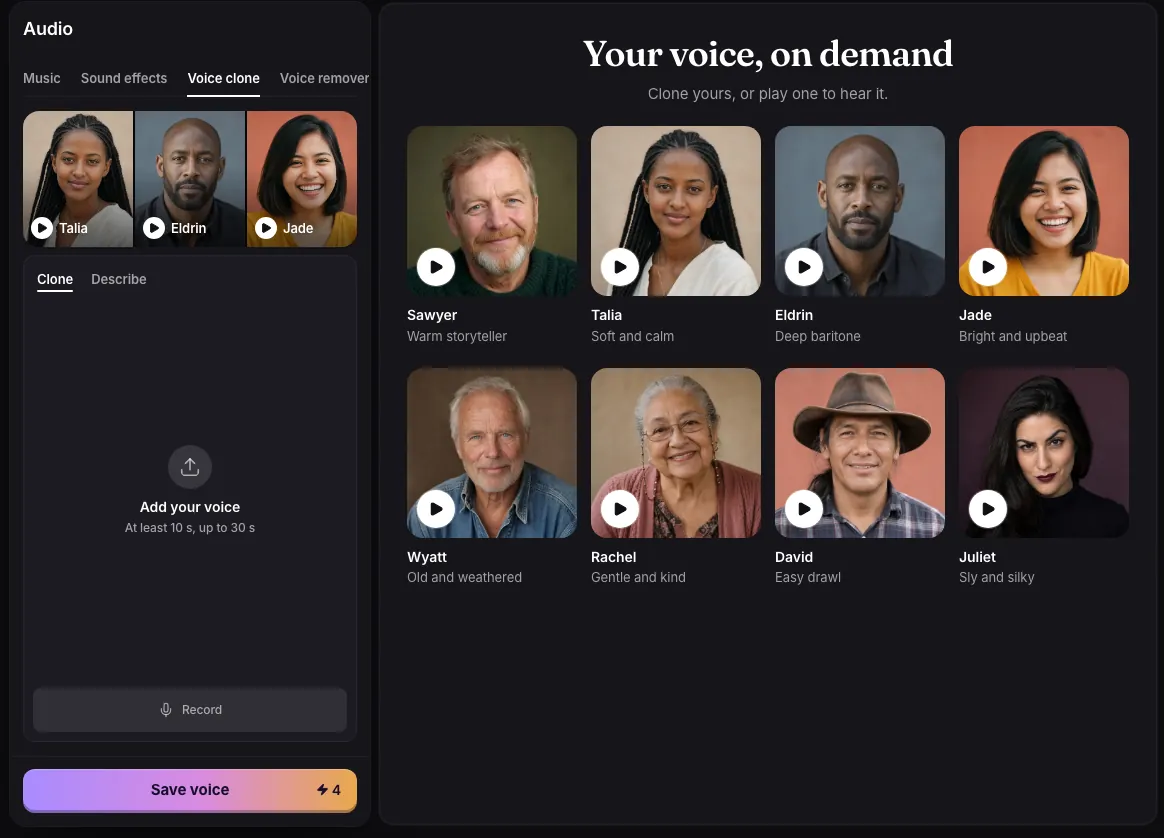
- Choose Clone, then Record, or Add your voice to upload a file.
- Talk naturally for at least 10 seconds and up to 30. An upload of up to 45 seconds is trimmed to 30.
- Name the voice, tick “It’s my voice, or I have permission to use it”, and press Save voice.
Two ways to make a voice
- Clone copies a real voice from a recording: 4 credits, charged when you save it.
- Describe designs a new voice from a sentence such as “A warm, deep narrator, calm and steady”: 2 credits for three candidates, and keeping one is free.
You can keep up to 10 voices, rename or delete them, and save one with a character. Only clone your own voice, or one you have permission to use.
Common issues and fixes
| What you see | What to do |
|---|---|
| Record or upload your voice first. | Record the sample sentence or upload a recording of your voice. |
| Name your voice first. | Type a name. |
| Confirm it is your voice. | Tick it (clone only a voice you have the right to use). |
| Describe the voice in a sentence. | Describe it, for example 'A warm, deep narrator, calm and steady'. |
| Record at least 10 seconds. | Record again for at least 10 seconds of speech. |
Questions
How much audio do I need to clone a voice?
At least 10 seconds of natural speech, up to 30 seconds.
How many voices can I save?
Up to 10. You can rename or delete them.
Related
Updated November 18, 2026. Prices are in credits, as checked on that day.