 Fantasia
Help center / Video
Summarizer
Add a video of up to 60 minutes and get a 30, 60 or 90 second recap cut from its own footage, with narration and optional music. From 31 credits.
- Price
- From 31 credits
- Your video
- 10 seconds to 60 minutes, up to 2 GB
- Recap
- 30, 60 or 90 seconds
- Formats
- MP4, MOV, MPEG, WebM
When to use it
- You have a long video and want a short narrated recap cut from its own footage.
| If you want to | Use instead |
|---|---|
| A narrated video about a topic, drawn | Explainer |
Summarize a long video
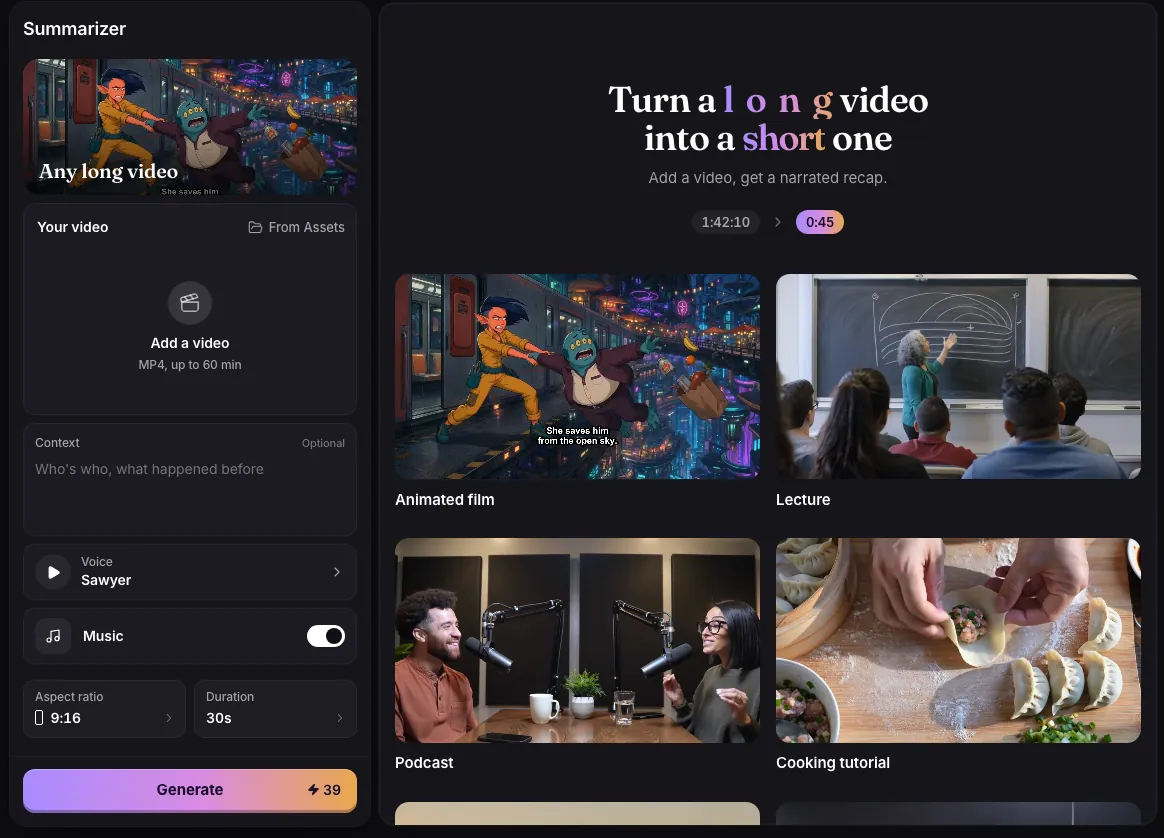
- Add your video: MP4, MOV, MPEG or WebM, from 10 seconds to 60 minutes and up to 2 GB.
- Optionally add Context, up to 600 characters, such as who is who or what happened before.
- Pick a voice, whether to add Music, the Aspect ratio (9:16, 1:1 or 16:9) and the Duration of the recap.
- Press Generate. The recap is cut from your own footage, in order, with narration over it.
What it costs
The price is 1 credit per minute of your video with a minimum of 25, plus 6 credits for every 30 seconds of recap, plus 8 for music.
| Your video | Recap | Music | Credits |
|---|---|---|---|
| 5 minutes | 30 seconds | On | 39 |
| 23 minutes | 1 minute | On | 45 |
| 40 minutes | 90 seconds | On | 66 |
| 40 minutes | 90 seconds | Off | 58 |
| 60 minutes | 90 seconds | On | 86 |
Picking the length
Fantasia suggests a length from your video: 30 seconds for videos up to 6 minutes, 1 minute up to 18 minutes, and 90 seconds for anything longer. You can change it, but a video over 18 minutes cannot be squeezed into 30 seconds.
The whole video is watched before anything is cut, so the recap follows the story from start to finish rather than picking random moments. Use Context to name people or explain what the viewer needs to know.
Common issues and fixes
| What you see | What to do |
|---|---|
| Use an MP4, MOV, MPEG or WebM video. | Convert the file to MP4. |
| That video is too large. The limit is 2 GB. | Compress or trim the video below 2 GB. |
| Choose a video between 10 seconds and 60 minutes. | Use a clip within the range. |
| This video needs a longer summary. Pick a longer length. | Pick 60 or 90 seconds. |
| The upload didn’t finish. Check your connection and try again. | Check the connection and press Generate again. |
Questions
How long a video can I summarize?
Up to 60 minutes and 2 GB, and at least 10 seconds.
Does it use my own footage?
Yes. The recap is cut from your video and narrated, so nothing in it is generated footage.
Can the narration be in another language?
On the website, narration is in English.
How much does it cost to summarize an hour-long video?
86 credits for a 90 second recap with music, or 78 without music.
Related
Updated November 18, 2026. Prices are in credits, as checked on that day.