 Fantasia
Help center / Video
Create Video
The 13 video models on Fantasia, from Kling 4.0 to Seedance 2.5: what each takes, how long its clips run and what a clip costs in credits.
- Price
- From 7 credits a clip; 47 for the default
- Length
- 2 to 30 seconds
- Resolution
- 360p to 4K
- Starts from
- A prompt, a first frame or references
When to use it
- You want a new clip from words, from a picture, or from reference photos of a person, product or place.
- You want to pick the model yourself and compare prices.
| If you want to | Use instead |
|---|---|
| Copy a move from a video onto a photo | Motion Control |
| Make a photo talk | Lip Sync |
| Change a clip you already have | Edit Video |
Make a video from a prompt or a photo
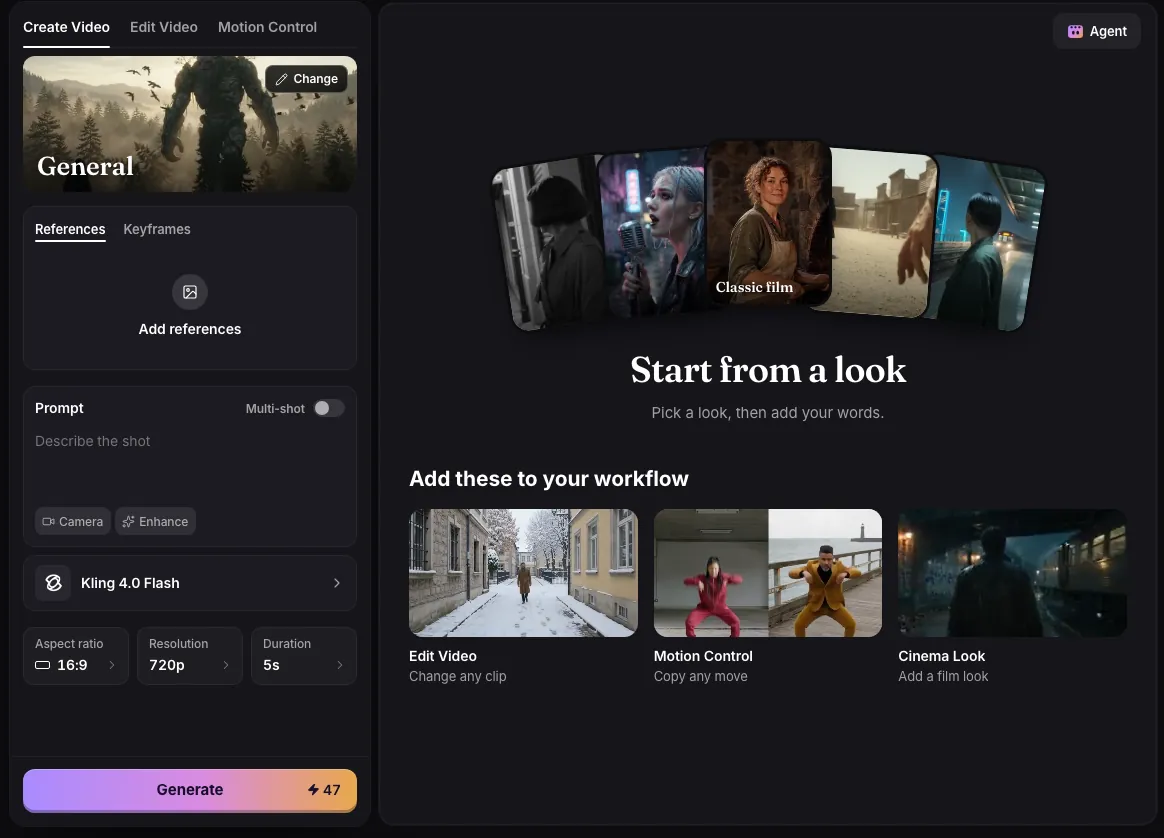
- Describe the shot in the Prompt box, up to 2,000 characters. To start from a picture, add it under Keyframes as the First frame; a first frame on its own is enough.
- Pick a model, then Aspect ratio, Resolution and Duration. The Generate button updates its price as you change them.
- Press Generate, or Enter in the prompt box. One press makes one video.
- Watch it on the page when it is done. It is also saved in Assets.
The models
New visitors start on Kling 4.0 Flash at 720p, 16:9 and 5 seconds, which costs 47 credits. The price column is a 5 second clip from a prompt, at 720p unless the model only offers less.
| Model | Length in seconds | Resolutions | 5 seconds | Starts from |
|---|---|---|---|---|
| Kling 4.0 Flash | 3 to 20 | 720p | 47 | A prompt, a first frame, or up to 10 reference pictures |
| Kling 4.0 | 3 to 15 | 720p, 1080p | 79 | First and last frame, up to 4 pictures and 5 clips |
| Omni 1.2 | 3 to 15 | 360p, 720p, 1080p | 35 (12 at 360p) | First and last frame, up to 6 pictures. 16:9 and 9:16 only |
| MiniMax H3 Max | 5 to 15 | 720p, 1080p | 40 | First and last frame, up to 12 pictures and clips in all |
| MiniMax H3 | 5 to 15 | 720p, 2K, 4K | 30 | A first frame, up to 9 pictures and 3 clips |
| MiniMax H3 Turbo | 5 to 15 | 480p, 720p | 25 (15 at 480p) | A prompt or a first frame |
| Wan 3.0 | 2 to 30 | 720p, 1080p | 50 | First and last frame, up to 10 pictures and 5 clips |
| Seedance 2.5 (Pro) | 4 to 30 | 720p | 116 | First and last frame, or up to 4 pictures and clips in all |
| Seedance 2.0 (Pro) | 4 to 15 | 720p, 1080p, 4K | 90 | First and last frame, or up to 4 pictures and clips in all |
| Seedance 2.0 Mini | 4 to 15 | 480p, 720p | 45 (20 at 480p) | A first frame, or up to 4 pictures and clips in all |
| Seedance 2.0 Fast | 4 to 15 | 480p, 720p | 75 (35 at 480p) | A prompt, or up to 4 reference pictures and clips in all (no keyframes) |
| HappyHorse 1.1 (Pro) | 3 to 15 | 720p, 1080p | 70 | A prompt or a first frame |
| Grok Imagine Video | 4 to 15 | 480p, 720p | 40 | A first frame is required |
- Prices grow with length: a 10 second Kling 4.0 clip at 720p is 157 credits, a 30 second Wan 3.0 clip at 720p is 300.
- The Duration picker offers the model’s shortest length, 5, 10 and 15 seconds, and its longest.
- 1080p and 2K need the Pro plan, 4K needs Creator. Seedance 2.0, Seedance 2.5 and HappyHorse 1.1 need Pro at any resolution. Every model is in the menu; the plan is checked when you press Generate.
- Kling 4.0 Flash, Kling 4.0, Omni 1.2, Wan 3.0, every Seedance model, HappyHorse 1.1 and Grok Imagine Video make sound along with the picture.
References and keyframes
The upload card has two tabs. Keyframes sets the First frame and, on models that take one, the Last frame: the video starts on your picture and ends on the other. References takes pictures, and clips on models that accept them, as material for the shot: a face, an outfit, a product, a place. Type @ in the prompt to name one, for example “@Image1 walks into @Image2”. A tab the model cannot use is greyed out.
Uploads can be JPEG, PNG or WebP pictures and MP4 videos, up to 50 MB each. If you add a clip to a model that takes no clips, Fantasia uses the clip’s last frame as a picture instead and tells you so.
Adding a reference clip raises the price on Kling 4.0, Wan 3.0, MiniMax H3 and every Seedance model, because the clip is processed too. A 5 second Kling 4.0 clip goes from 79 to 94 credits with a 5 second reference clip, and Seedance 2.5 from 116 to 484. MiniMax H3 also adds 8 credits for each picture past five.
Reference pictures on MiniMax H3 Max cost a little extra once they pass a free allowance. Three wide pictures take a 5 second 720p clip from 40 to 43 credits, and a 5 second reference clip takes it to 107. Keyframes are not charged this way.
Multi-shot
Turn on Multi-shot next to the Prompt label to write up to 6 shots, each with its own description and length (on Seedance 2.0, Mini and Fast the Duration picker sets the length). The shots add up to the clip’s length and are priced as one video of that length. Kling 4.0 receives them as a real shot list; the other models get them written into one prompt in the form each model follows best. HappyHorse 1.1 and Grok Imagine Video have no Multi-shot.
Writing the prompt
- Describe what happens and how it is filmed. The Camera chip adds a camera move for you: Static, Push in, Pull out, Pan, Orbit, Crane up, Handheld or FPV.
- Enhance rewrites your prompt in more detail, free. Press it again to get your own words back. It can be used 30 times an hour.
- With a first frame, describe what happens from that picture rather than the picture itself.
- Need a starting point? The General card above the prompt opens film looks and every template.
Templates
Templates are finished 5 second clips with the exact prompt, model and shape that made them. Open one to read and copy its prompt, then press Use template: Create Video opens with that prompt, model, aspect ratio and length set for this visit. Nothing is charged until you press Generate. Most templates run on Omni 1.2, 35 credits at 720p; two run on Kling 4.0, 79 credits.
Examples
Perfume wave
Prompt
A square glass perfume bottle of amber liquid stands on wet black stone. A slow wave of water sweeps across the stone and breaks around the bottle in slow motion, droplets hanging in the air, a hard warm backlight glowing through the glass, dark background. Macro product shot, slow push in. No text, captions or logos on screen.
- Model
- Omni 1.2
- Aspect ratio
- 9:16
- Duration
- 5 seconds
Noir detective
Prompt
Black and white film noir. A detective in a trench coat and hat stands under a streetlamp in heavy rain at night and lights a cigarette in cupped hands, the flame lighting his face for a second, then looks up toward a lit window across the street. Deep shadows, wet cobbles, slow dolly in, 1940s film grain. No text, captions or logos on screen.
- Model
- Omni 1.2
- Aspect ratio
- 16:9
- Duration
- 5 seconds
Unboxing haul
Prompt
Vertical unboxing video shot on a phone propped on a coffee table, fixed camera, one continuous take. A man in his late twenties with a short fade haircut, a trimmed beard and a mustard hoodie sits on the floor in front of his sofa, facing the lens. A small plain white box rests flat on the coffee table in front of him. With both hands he lifts the lid off, sets it down on the table, takes out a chunky steel wristwatch, raises his eyebrows and holds the watch up beside his face, laughing as he talks to the camera. The box stays on the table the whole time. Warm lamp light in the evening, casual and unpolished. No text, captions or logos on screen.
- Model
- Kling 4.0
- Aspect ratio
- 9:16
- Duration
- 5 seconds
Common issues and fixes
| What you see | What to do |
|---|---|
| Describe the shot first. | Type what should happen in the shot, then press Generate again. |
| This prompt can’t be used. Try other words. | Reword the prompt; trying the same words again is blocked again. |
| Needs 79 credits. You have 12. | Top up credits, or pick a shorter duration, a lower resolution or a cheaper model so the price fits. |
| Kling 4.0 takes up to 4 pictures. | Remove references until the count fits, or pick a model that takes more. |
| Couldn’t start the video. Try again. | Press Generate again; if it repeats, pick another model. |
Questions
What is the cheapest way to make a video on Fantasia?
Omni 1.2 at 360p: 12 credits for 5 seconds. MiniMax H3 Turbo at 480p is 15 credits, and Seedance 2.0 Mini at 480p is 20.
How long can a video be?
Up to 30 seconds in one clip on Wan 3.0 and Seedance 2.5, and 20 seconds on Kling 4.0 Flash. Most other models go up to 15 seconds.
Can I set the first and the last frame?
Yes, on Kling 4.0, Omni 1.2 (up to 10 seconds with a last frame), MiniMax H3 Max, Wan 3.0, Seedance 2.0 and Seedance 2.5. Add both pictures under Keyframes.
Which models make sound?
Kling 4.0 Flash, Kling 4.0, Omni 1.2, Wan 3.0, all four Seedance models, HappyHorse 1.1 and Grok Imagine Video generate sound with the video.
Can I make more than one video at a time?
Basic runs one generation at a time, Pro two and Creator four. When every slot is busy the button says Waiting for a slot and starts on its own when one frees up, without charging twice.
Related
Updated November 18, 2026. Prices are in credits, as checked on that day.